Author: hello@chinmaypanda.com

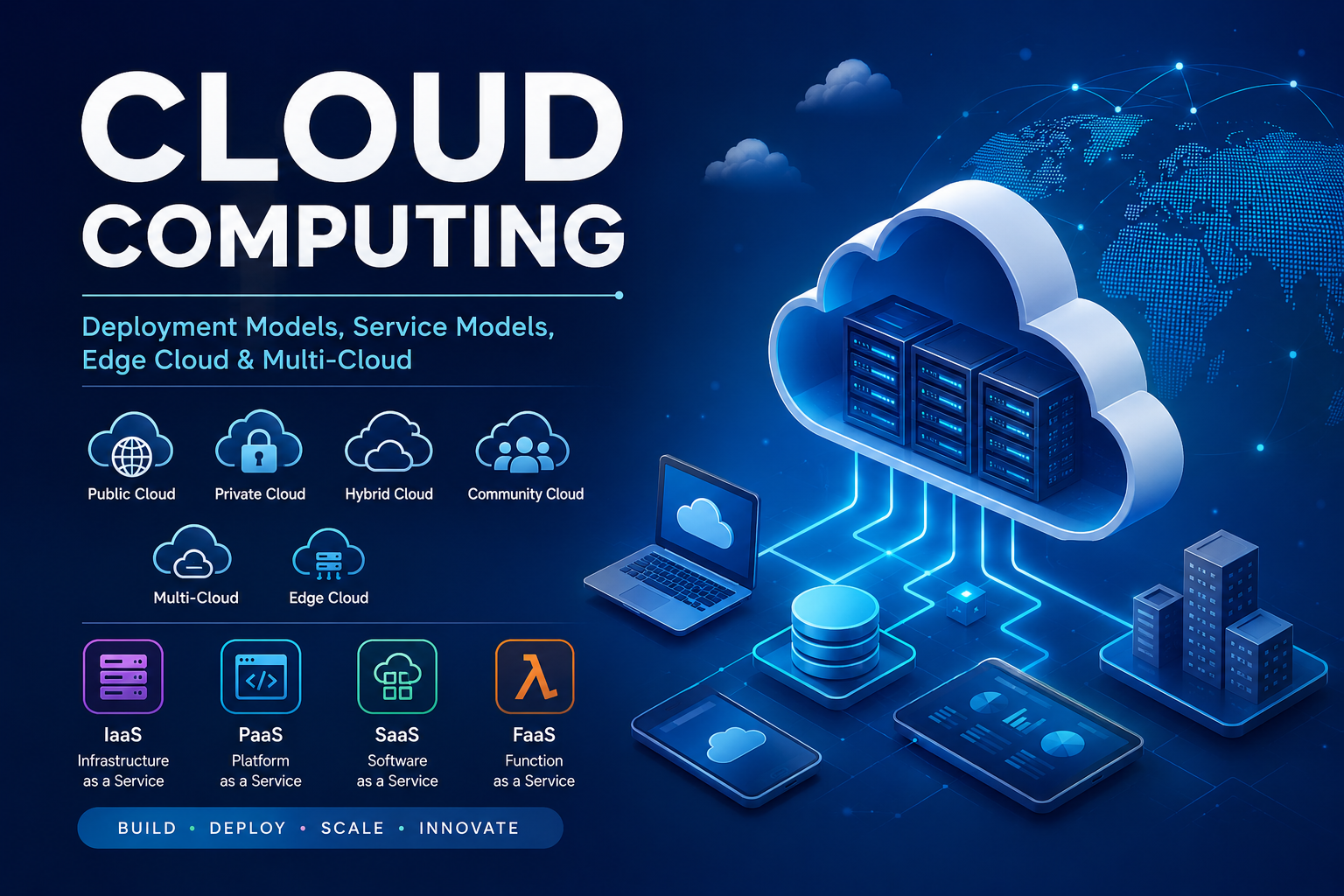
  • Understanding Cloud Computing: Deployment Models, Service Models, Edge Cloud, and Multi-Cloud

    Understanding Cloud Computing: Deployment Models, Service Models, Edge Cloud, and Multi-Cloud

    Cloud computing has transformed how organizations build, deploy, and manage applications and infrastructure. Instead of owning and maintaining physical servers, businesses can access computing resources over the internet on demand.

    According to Wikipedia and standard cloud computing references, cloud concepts are generally divided into deployment models and service models. Modern cloud architectures also include concepts such as Edge Cloud and Multi-Cloud.


    What Is Cloud Computing?

    Cloud computing is the delivery of computing services such as servers, storage, databases, networking, and software over the internet.

    Rather than buying hardware and managing everything locally, users can rent resources from cloud providers and scale them as needed.

    Popular cloud providers include:

    • Amazon Web Services (AWS)
    • Microsoft Azure
    • Google Cloud Platform (GCP)
    • IBM Cloud
    • Oracle Cloud

    Cloud Deployment Models

    Deployment models describe who owns the cloud infrastructure and how it is accessed.

    1. Public Cloud

    A public cloud is operated by a third-party provider and shared among multiple customers over the internet.

    Examples:

    • AWS
    • Microsoft Azure
    • Google Cloud

    Characteristics

    • Shared infrastructure
    • Pay-as-you-go pricing
    • Highly scalable
    • Easy to deploy

    Common Uses

    • Web hosting
    • Mobile applications
    • Startups
    • SaaS applications

    Advantages

    • Low upfront cost
    • Fast deployment
    • Global availability

    Disadvantages

    • Less infrastructure control
    • Shared environment

    2. Private Cloud

    A private cloud is dedicated to a single organization.

    It may run:

    • On-premises
    • In a private data center
    • On dedicated bare metal infrastructure

    Characteristics

    • Dedicated resources
    • Higher security and control
    • Customizable infrastructure

    Common Uses

    • Banking
    • Government systems
    • Healthcare
    • Enterprise internal platforms

    Advantages

    • Better compliance
    • Greater control
    • Improved security

    Disadvantages

    • Higher cost
    • More operational complexity

    3. Hybrid Cloud

    A hybrid cloud combines multiple deployment models, typically public and private cloud environments.

    Example:

    • Sensitive data in private cloud
    • Public-facing applications in public cloud

    Characteristics

    • Mixed infrastructure
    • Flexible workload placement
    • Shared orchestration between environments

    Common Uses

    • Disaster recovery
    • Data backup
    • Enterprise modernization

    Advantages

    • Flexibility
    • Cost optimization
    • Better scalability

    Disadvantages

    • Complex management
    • Networking challenges

    4. Community Cloud

    A community cloud is shared by organizations with similar operational or compliance requirements.

    Examples:

    • Universities
    • Government agencies
    • Healthcare organizations

    Characteristics

    • Shared infrastructure
    • Common compliance policies
    • Collaborative environment

    Advantages

    • Shared cost
    • Shared governance

    Disadvantages

    • Limited flexibility
    • Smaller scale than public cloud

    Modern Cloud Architecture Models

    These models extend traditional deployment concepts.


    5. Multi-Cloud

    Multi-cloud means using services from multiple cloud providers simultaneously.

    Example:

    • AWS for compute
    • Azure for identity management
    • Google Cloud for AI workloads

    Characteristics

    • Multiple providers
    • Distributed workloads
    • Reduced vendor dependency

    Advantages

    • Avoid vendor lock-in
    • Better resilience
    • Provider specialization

    Disadvantages

    • Operational complexity
    • Multiple billing systems
    • Cross-cloud integration challenges

    6. Edge Cloud (Edge Computing)

    Edge cloud places computing resources closer to users or devices instead of relying entirely on centralized cloud data centers.

    Example

    Traditional cloud:
    User → Internet → Central cloud data center

    Edge cloud:
    User → Nearby edge node → Faster response

    Characteristics

    • Low latency
    • Local processing
    • Distributed infrastructure

    Common Uses

    • IoT
    • Smart cities
    • Online gaming
    • Video streaming
    • Autonomous vehicles
    • 5G networks

    Advantages

    • Faster response time
    • Reduced bandwidth usage
    • Better real-time performance

    Disadvantages

    • Distributed management complexity
    • Security challenges

    Cloud Service Models

    Service models describe what level of service the cloud provider offers.


    1. Infrastructure as a Service (IaaS)

    IaaS provides virtualized computing resources such as:

    • Virtual machines
    • Storage
    • Networking

    Users manage:

    • Operating systems
    • Applications
    • Middleware

    Provider manages:

    • Physical infrastructure

    Examples

    • Amazon EC2
    • Google Compute Engine
    • Azure Virtual Machines

    Best For

    • System administrators
    • Infrastructure hosting
    • Custom server environments

    2. Platform as a Service (PaaS)

    PaaS provides a platform for developing and deploying applications without managing underlying infrastructure.

    Provider manages:

    • Servers
    • Operating systems
    • Runtime environments

    Users manage:

    • Applications
    • Data

    Examples

    • Heroku
    • Google App Engine
    • Azure App Service

    Best For

    • Application developers
    • Rapid deployment

    3. Software as a Service (SaaS)

    SaaS delivers complete software applications over the internet.

    Users simply access the software through a browser or application.

    Examples

    • Gmail
    • Microsoft 365
    • Salesforce
    • Dropbox

    Best For

    • End users
    • Businesses needing ready-made software

    4. Function as a Service (FaaS) / Serverless Computing

    FaaS allows developers to run code without managing servers.

    Applications execute only when triggered.

    Examples

    • AWS Lambda
    • Azure Functions
    • Google Cloud Functions

    Characteristics

    • Event-driven
    • Auto-scaling
    • Pay-per-execution

    Best For

    • APIs
    • Automation
    • Event processing

    Relationship Between Deployment Models and Service Models

    Both models work together.

    Example:

    Deployment ModelService Model
    Public CloudSaaS
    Private CloudIaaS
    Hybrid CloudPaaS
    Edge CloudServerless

    An organization may use:

    • Public cloud deployment
    • Combined with IaaS and SaaS services
    • While also operating edge infrastructure

    Bare Metal, VPS, and Hypervisors in Cloud Platforms

    Modern cloud platforms are built using virtualization technologies.

    Bare Metal Servers

    A bare metal server is a dedicated physical server.

    Advantages:

    • High performance
    • Full hardware access
    • Best for cloud infrastructure

    Hypervisors

    A hypervisor creates and manages virtual machines.

    Examples:

    • VMware ESXi
    • KVM
    • Hyper-V

    Hypervisors enable:

    • VPS hosting
    • Virtualized clouds
    • Infrastructure sharing

    VPS (Virtual Private Server)

    A VPS is a virtual machine created using a hypervisor on a physical server.

    It provides:

    • Isolated environments
    • Dedicated virtual resources
    • Lower cost than bare metal

    Conclusion

    Cloud computing includes multiple deployment strategies and service delivery models designed for different business and technical requirements.

    Traditional deployment models include:

    • Public cloud
    • Private cloud
    • Hybrid cloud
    • Community cloud

    Modern cloud architectures include:

    • Multi-cloud
    • Edge cloud

    Cloud service models include:

    • IaaS
    • PaaS
    • SaaS
    • FaaS/Serverless

    Together, these technologies form the foundation of modern digital infrastructure powering applications, AI systems, enterprise platforms, telecommunications, and internet services worldwide.
  • What is the best way to host a Cloud platform?

    The best way to host a cloud platform is on bare metal servers, not on a VPS.

    Recommended setup

    Bare metal servers → Hypervisor/cloud software → VMs/containers → users/apps

    Why bare metal is best

    • Full control over hardware
    • Better performance
    • Supports nested virtualization properly
    • More reliable networking and storage
    • Better for production workloads
    • Easier to sell VPS/cloud services from it

    Good cloud platform options

    For learning or small private cloud:

    • Proxmox VE
    • OpenStack
    • Apache CloudStack
    • Kubernetes for container-based cloud apps

    For production:

    • Multiple bare metal servers
    • Redundant storage
    • Dedicated networking
    • Backup system
    • Monitoring
    • Firewall/security setup
    • Cloud management software like OpenStack, CloudStack, or Proxmox

    Simple recommendation

    Use:

    Bare metal server + Proxmox if you want an easier private cloud.

    Use:

    Multiple bare metal servers + OpenStack/CloudStack if you want a larger cloud platform like a real cloud provider.

    A VPS is okay only for learning or testing, not for serious cloud hosting.

  • Can a cloud platform be installed on a vps

    Yes — a cloud platform can be installed on a VPS, but usually only in a small, limited, or learning/testing setup.

    For example, you can install tools like:

    • OpenStack
    • CloudStack
    • Proxmox
    • Kubernetes
    • MicroCloud / MicroK8s

    But there is an important difference:

    A VPS is already a virtual server running on someone else’s physical server. So if you install a cloud platform on a VPS, you are building a cloud environment inside a virtual machine.

    This is called nested virtualization.

    Simple view

    Physical server
    Hypervisor
    VPS
    Your cloud platform
    VMs / containers / services

    It works best for

    • Learning cloud concepts
    • Testing cloud software
    • Running containers
    • Small lab environments
    • Building demos

    It is not ideal for

    • Serious production cloud hosting
    • Running many virtual machines
    • High-performance workloads
    • Selling VPS/cloud services
    • Heavy storage or networking workloads

    Why?

    Because many VPS providers do not support nested virtualization, and performance can be slower since everything is already virtualized.

    For a real cloud platform, bare metal servers are usually better.

  • What is a Cloud Platform

    A cloud platform is an online service that gives you computing resources over the internet, such as:

    • Servers
    • Storage
    • Databases
    • Networking
    • Security tools
    • AI/ML services
    • App hosting

    Instead of buying and managing your own physical servers, you rent resources from a cloud provider.

    Simple example

    Think of a cloud platform like an electricity provider.

    You do not build your own power plant. You use electricity when you need it and pay for what you use.

    Similarly, with a cloud platform, you use computing power when needed and pay based on usage.

    Popular cloud platforms

    • AWS
    • Microsoft Azure
    • Google Cloud Platform
    • IBM Cloud
    • Oracle Cloud

    What you can do on a cloud platform

    • Host websites and apps
    • Store files and backups
    • Run virtual servers
    • Manage databases
    • Deploy AI models
    • Build scalable software systems

    In one sentence

    A cloud platform lets you access and manage computing resources online without owning the physical infrastructure.

  • What is a Hyper Visor

    A hypervisor is software that creates and manages virtual machines (VMs) on a physical server.

    It sits between the hardware and the virtual servers, sharing the physical server’s CPU, RAM, storage, and network across multiple VMs.

    Simple example

    Think of one physical server as an apartment building.

    • Physical server = the building
    • Hypervisor = the building manager
    • Virtual machines / VPSs = separate apartments

    The hypervisor makes sure each VM gets its own resources and stays isolated from the others.

    What a hypervisor does

    • Creates virtual machines
    • Allocates CPU, RAM, storage, and networking
    • Keeps VMs isolated from each other
    • Lets multiple operating systems run on one physical machine
    • Helps move, pause, start, or stop VMs

    Types of hypervisors

    TypeMeaningExample
    Type 1Runs directly on physical hardwareVMware ESXi, Microsoft Hyper-V, KVM
    Type 2Runs inside an existing operating systemVirtualBox, VMware Workstation

    In VPS hosting

    A VPS exists because a hypervisor divides one physical server into multiple private virtual servers.

  • What is Virtual Private Server (VPS)

    What is Virtual Private Server (VPS)

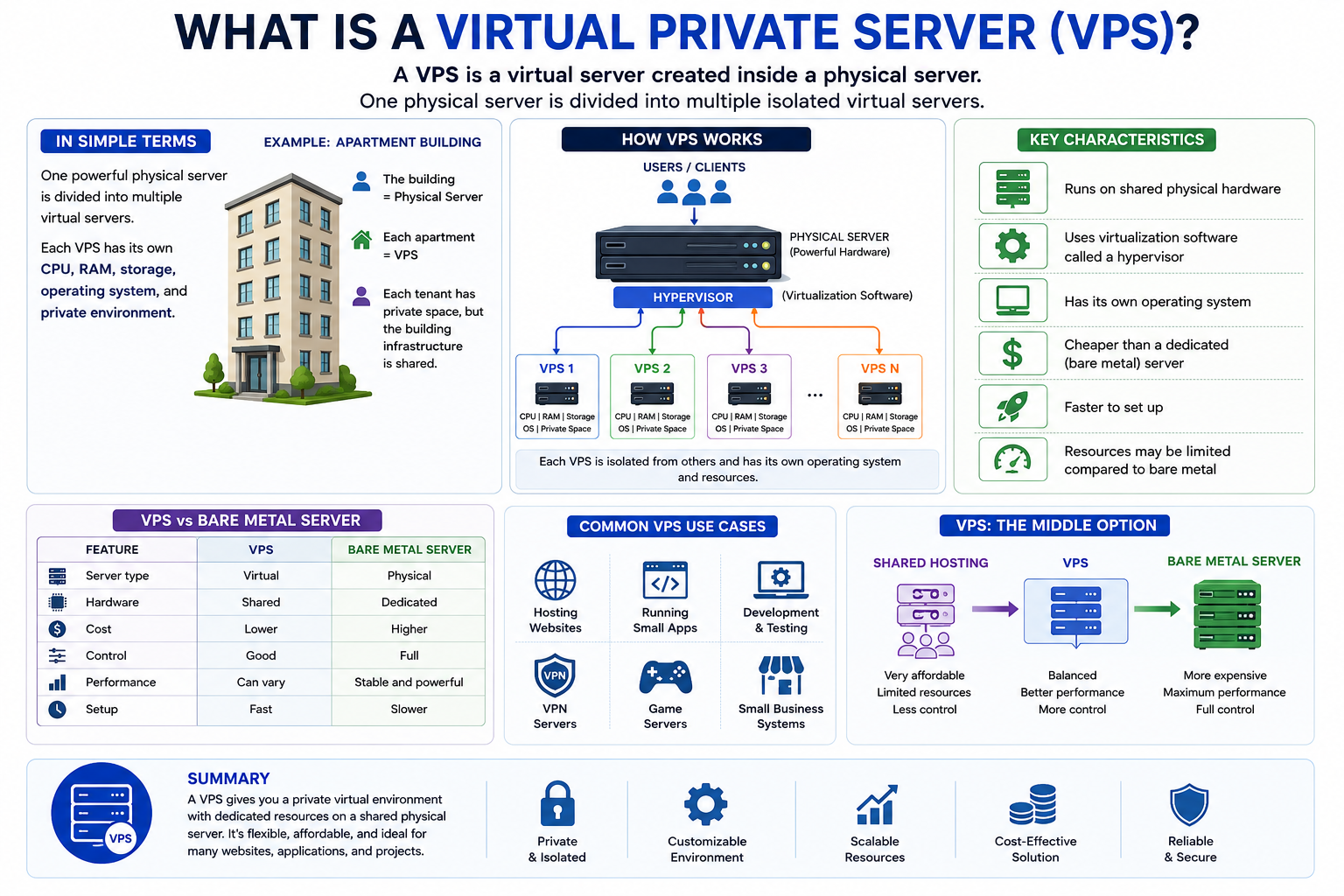
    A Virtual Private Server (VPS) is a virtual server created inside a physical server.

    In simple terms: one powerful physical server is divided into multiple smaller virtual servers. Each VPS gets its own CPU, RAM, storage, operating system, and private environment.

    Example

    Imagine one apartment building:

    • The building = physical server
    • Each apartment = VPS
    • Each tenant has private space, but the building infrastructure is shared

    VPS characteristics

    • Runs on shared physical hardware
    • Uses virtualization software called a hypervisor
    • Has its own operating system
    • Cheaper than a dedicated or bare metal server
    • Faster to set up
    • Resources may be limited compared to bare metal

    VPS vs Bare Metal Server

    FeatureVPSBare Metal Server
    Server typeVirtualPhysical
    HardwareSharedDedicated
    CostLowerHigher
    ControlGoodFull
    PerformanceCan varyStable and powerful
    SetupFastSlower

    Common VPS use cases

    • Hosting websites
    • Running small apps
    • Development and testing
    • VPN servers
    • Game servers
    • Small business systems

    A VPS is a good middle option between shared hosting and a dedicated bare metal server.

  • What is a Bare Metal Server?

    What is a Bare Metal Server?

    What is a bare metal server
    What is a bare metal server

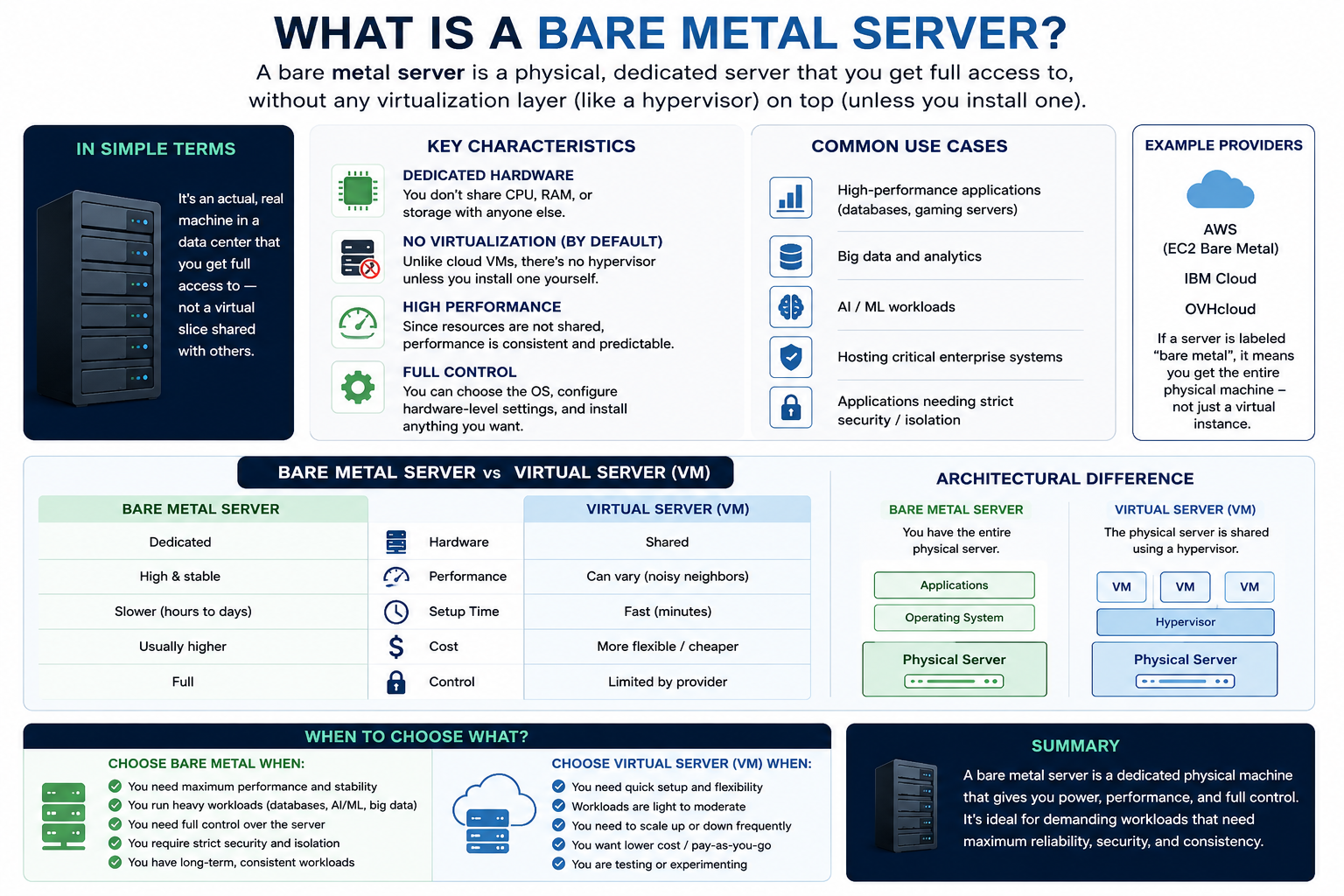
    A bare metal server is a physical, dedicated server that is used by a single customer, without any virtualization layer (like a hypervisor) sitting on top.

    In simple terms:

    It’s an actual, real machine in a data center that you get full access to — not a virtual slice shared with others.


    Key characteristics:

    • Dedicated hardware
      You don’t share CPU, RAM, or storage with anyone else.
    • No virtualization (by default)
      Unlike cloud VMs, there’s no hypervisor unless you install one yourself.
    • High performance
      Since resources are not shared, performance is consistent and predictable.
    • Full control
      You can choose the OS, configure hardware-level settings, and install anything you want.

    Bare metal vs Virtual server (quick comparison):

    FeatureBare Metal ServerVirtual Server (VM)
    HardwareDedicatedShared
    PerformanceHigh & stableCan vary
    Setup timeSlowerFast
    CostUsually higherMore flexible/cheaper
    ControlFullLimited by provider

    Common use cases:

    • High-performance applications (databases, gaming servers)
    • Big data and analytics
    • AI/ML workloads
    • Hosting critical enterprise systems
    • Applications needing strict security/isolation

    Example:

    If you rent a server from providers like AWS (EC2 Bare Metal), IBM Cloud, or OVH, and it’s labeled “bare metal”, it means you get the entire physical machine—not just a virtual instance.